
Safety
Schedule and sign off drills and work permits, on a colour-coded timeline.
Everything in the Safety module
Drills, permits & sign-offs, built into one connected module, accessible on any device, online or offline.
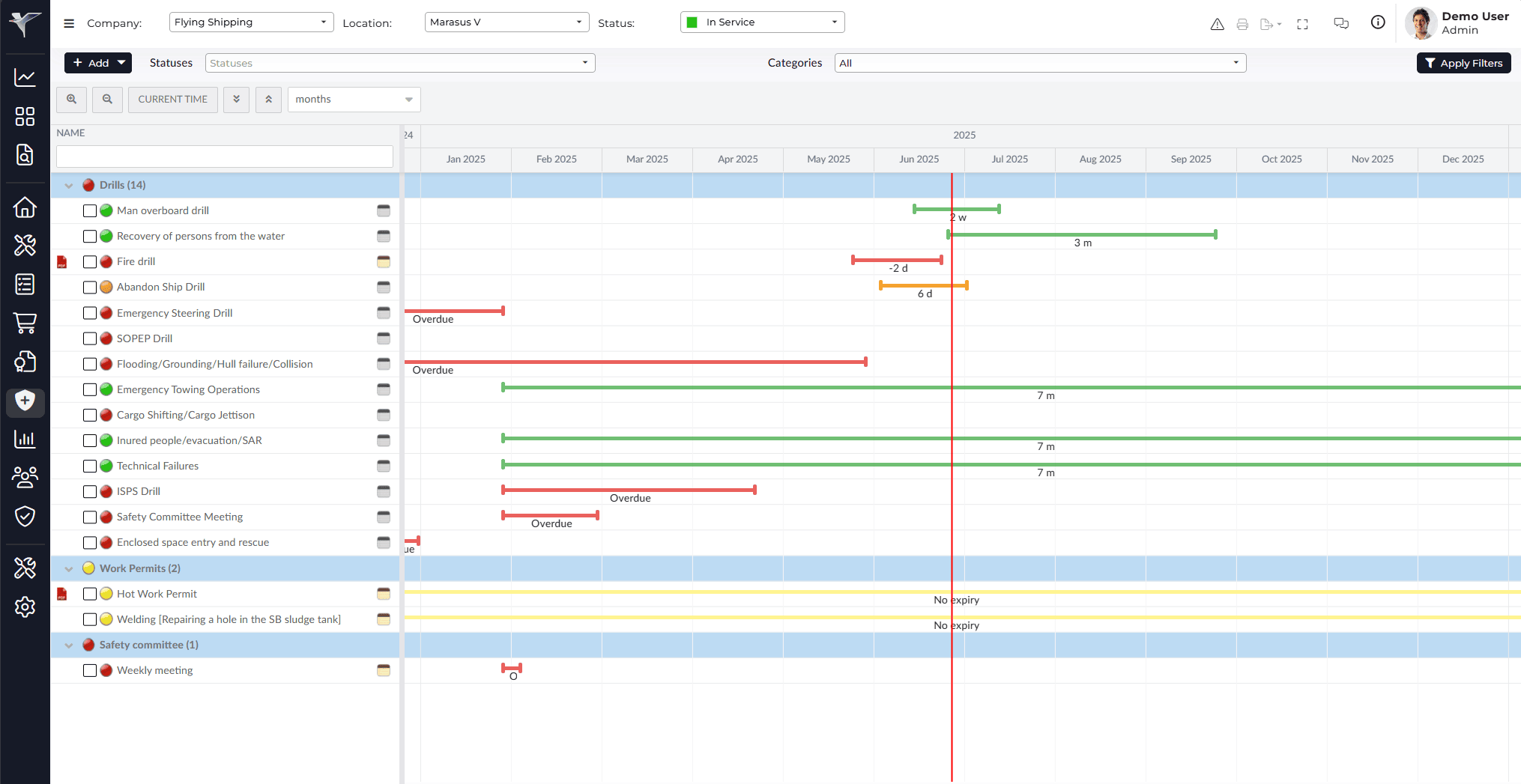
Timeline
A colour-coded graph of every drill and permit by category. Green on track, orange due this month, red overdue, yellow no interval.
Drills & work permits
Track any recurring or one-time safety item, from drills such as fire and abandon ship to work permits, each with its own interval and category.
Sign off with an evaluation
Sign off a completed drill or permit with a place, crew present, and description, and Marad calculates the next start and due date automatically.
Templates & documents
Set a default evaluation template so crew fill in the same fields every time, and attach the procedure or manual a drill must follow.
Crew participation & sign-off controls
Require crew members to be ticked off, a document attached, or a digital signature before a drill counts as complete, and hide sensitive items by rank.
History, export & lay-up mode
Every completed item is kept in History with its evaluation, exportable to PDF or Excel, and the whole module can be paused during lay-up.
How it works
Up and running in hours, not weeks. The typical workflow from setup to daily operations.
Set up your categories
Create categories such as Drills or Work Permits, and add each safety item with its interval and due date.
Track on the Timeline
See every item colour-coded by status: green on track, orange due, red overdue, yellow no interval.
Sign off when carried out
Fill in the evaluation, tick off crew who took part, and attach documents. Marad sets the next due date.
Review in History
Every signed-off item is kept in History with its evaluation, filterable by category and exportable.
Works together with
Data flows automatically between connected modules: no manual entry, no duplication.
See Safety in action
Start a free 30-day trial, no credit card required. Or book a personalised demo and we'll walk you through the Safety module with your own vessel data.